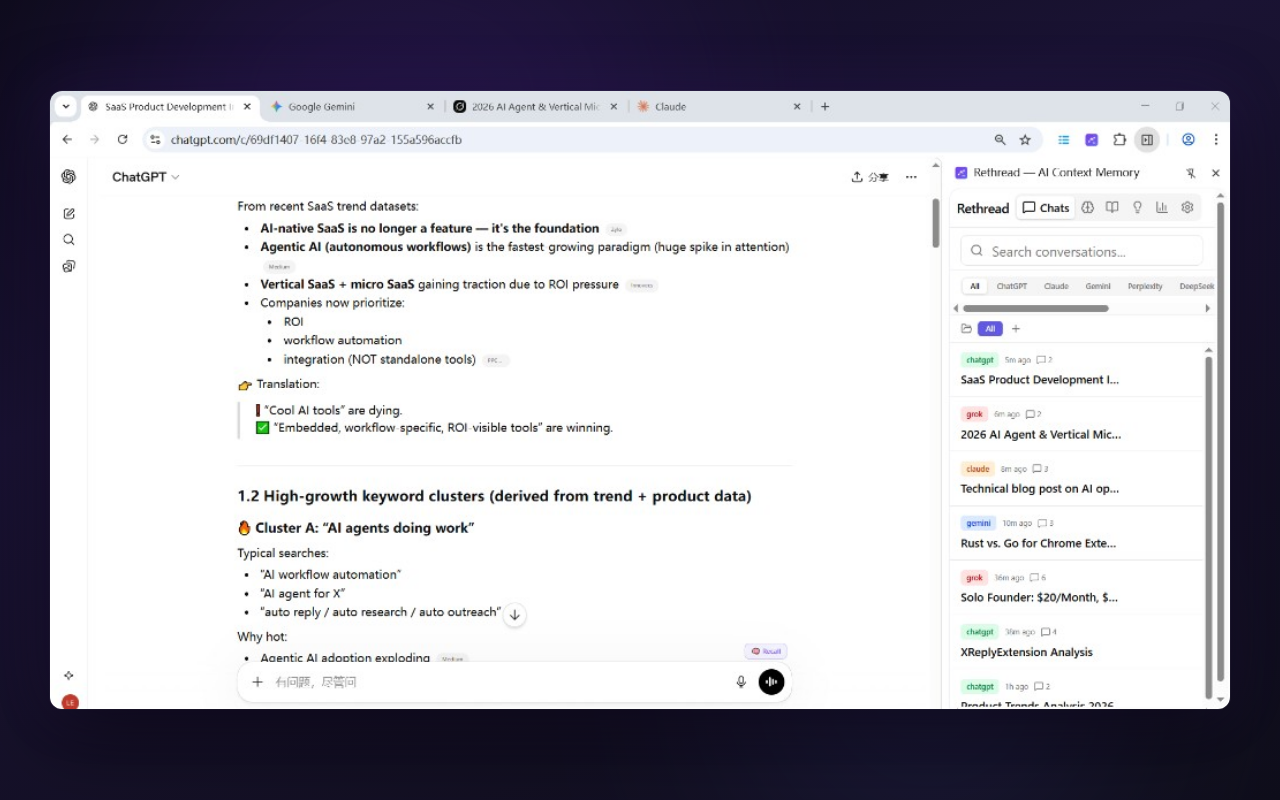
Why add an extension when ChatGPT already has Memory?
OpenAI's current Memory system can use saved memories and, when available for your plan and settings, reference past chat history. That is valuable. Rethread solves a different problem: owning a reusable context library that is not limited to one AI provider. See OpenAI's official Memory FAQ for current availability and controls.
- Provider portability. ChatGPT Memory stays in ChatGPT. Rethread makes the same context available in Claude, Gemini, Grok, Perplexity, and DeepSeek.
- Selective recall. Before sending, you can search, edit, and choose the exact memories to inject, with a live token estimate.
- Structured organization. Facts, preferences, decisions, and project context can be grouped with buckets, folders, and tags.
- Local-first ownership. The free plan stores memories in your browser by default. Optional Pro sync encrypts them before upload.
- A separate archive. Search conversations, create snapshots, compare changes, and export your own data.
What Rethread does differently
Rethread is a Chrome extension that runs alongside ChatGPT and five other AI platforms. It:
- Watches your conversations passively on the page itself, then extracts structured "memories" — facts, preferences, decisions, and context — from what you actually said.
- Stores them locally in your browser's IndexedDB. No account, no signup, no server upload by default.
- Lets you organize, edit, and curate memories with buckets, folders, tags, and bulk operations.
- Re-injects relevant memories as a context block when you start a new conversation — in ChatGPT or any of the other five supported platforms.
- Optionally syncs across devices via end-to-end encrypted cloud sync (AES-256-GCM, key derived on-device with PBKDF2 + HKDF). The server stores only ciphertext.
Rethread vs. ChatGPT's built-in memory
| Capability | ChatGPT built-in memory | Rethread |
|---|---|---|
| View & manage individual memories | ✓ Built-in memory controls | ✓ Full editor with type, tags, bucket |
| Reference past ChatGPT chats | ✓ Depending on plan and settings | ✓ Full-text + tags + buckets |
| Works in Claude / Gemini / Grok / Perplexity / DeepSeek | ✗ ChatGPT only | ✓ All 6 platforms |
| Local-only mode | ✗ Server-side only | ✓ Default behavior |
| End-to-end encrypted cross-device sync | ✗ | ✓ Pro tier |
| Selective recall (pick which memories to inject) | Automatic provider selection | ✓ Full UI before each recall |
| Conversation snapshots & word-level diff | ✗ | ✓ |
| Daily Brief (yesterday's digest) | ✗ | ✓ 8 AM local |
| Bulk import past chat history | ✗ | ✓ ChatGPT & Claude exports |
| Free option | Varies by Memory feature and plan | ✓ Up to 100 memories, free forever |
How Rethread works on ChatGPT specifically
1. Install and open ChatGPT — that's it.
After you install Rethread from the Chrome Web Store and open chatgpt.com, a small Recall button appears next to the chat input. There is no account to create.
2. Chat normally. Memories build automatically.
As you talk to ChatGPT — explaining your codebase, your preferences, your team — Rethread silently extracts structured memories in the background. You'll see them appear in the side panel, classified as Fact, Preference, Decision, or Context.
3. Hit Alt+Shift+R on any new conversation.
Selective Recall opens. You can search, sort, edit, and pick exactly the memories you want injected — with a live token estimate so you never blow your context window. Click Inject, and a clean context block is dropped into your ChatGPT prompt.
4. Same memories, every other AI.
Switch tabs to Claude, Gemini, Grok, Perplexity, or DeepSeek and hit the same hotkey. The exact same memories you built up in ChatGPT are available — no re-tagging, no re-explaining.
What kinds of "ChatGPT memories" does Rethread capture?
Rethread distills conversations into four structured memory types — not raw chat logs:
- Facts — "I'm a senior backend engineer at a fintech startup using Go and PostgreSQL."
- Preferences — "Always write TypeScript in strict mode with explicit return types."
- Decisions — "We chose Cloudflare Workers + D1 over AWS Lambda for the v2 backend."
- Context — "My current project is a Chrome extension using WXT, Vue 3, and Pinia."
Each memory is timestamped, tagged with the platform it came from, and grouped into a color-coded bucket of your choosing.
Privacy: how is Rethread different from ChatGPT memory?
- Local by default. All memories live in your browser's IndexedDB. Nothing is sent to any server unless you explicitly enable cloud sync.
- Zero-knowledge cloud sync. If you turn on sync (Pro feature), encryption keys are derived on-device from a passphrase only you know. The server only ever sees ciphertext — by design, even we can't read your data.
- No tracking, no third-party analytics. Rethread does not phone home by default — anonymous usage counters are strictly opt-in, and there is never any third-party tracking.
- Minimal permissions. The six AI platform domains you actually use, plus licensing — no broad host access.
- Open to inspection. The full privacy policy documents every byte of data flow.
Frequently asked questions about Rethread for ChatGPT
chatgpt.com in Chrome.Stop re-explaining yourself to ChatGPT.
Install Rethread free and give every conversation lasting memory.
Add to Chrome — Free